JavaScript-Rendered Page Failures in AI Data Pipelines
Silent failures in AI pipelines let empty pages masquerade as valid data.

Most AI pipeline failures don't throw an error. A scraper hits a JavaScript-rendered page, gets back a technically valid HTML document, and reports success, because it did succeed at fetching HTML. The HTML is empty. Everything that mattered on that page loaded after the fact, through client-side code the scraper never ran, and nothing downstream knows to flag it.
That's how most modern web pages work now. A server sends a shell document, often just a handful of div tags and a pile of script references, and the actual content (prices, articles, product specs) gets built in the browser after JavaScript runs. A plain HTTP request never triggers that JavaScript. It grabs the shell and stops there. Parse that shell and you get a document that's structurally sound and functionally empty: no errors, no exceptions, no stack trace to catch.
47Billion and 7Seers documented a version of this. A teacher asks an AI tool for a slide deck on "Union Budget 2026 Highlights." The scraper hits the source page, gets the shell, returns nothing usable. The LLM, with no source material to work from, hallucinates confidently instead of failing. It hallucinates, confidently, and produces slides that look right, formatted right, structured right, and say nothing true. That output ships, because the source layer reported success the whole way through.
That's the distinction that makes this dangerous. A clean failure gets caught fast, because something breaks loudly enough for a person to notice. A silent failure just moves downstream, gets dressed up in the right format, and lands in front of a user. Around 68% of target sites now depend on client-side JavaScript to render their content. For most of the modern web, what a person sees in their browser never existed in the raw HTML the server sent out. The real ceiling on any AI-generated output is usually whatever fed the model.
How fragile selectors and anti-bot escalation compound the rendering problem
JavaScript rendering is the first issue. It's not the only one.
Most scraping tools rely on selectors: CSS classes, IDs, DOM paths pointing to exactly where a price or a headline sits on a page. Sites change that structure constantly. A class gets renamed during a frontend refresh, a lazy-loading component gets added, an iframe wraps content that used to sit right in the HTML. None of that breaks the site for a human visitor. All of it can quietly break a scraper built against the old layout.
Scrap.io described a pattern that will be familiar to anyone running multiple scrapers: a price tracker goes down from a CSS tweak, a competitor dashboard dies when a Cloudflare rule rolls out, a job aggregator breaks over a React component switching to lazy loading. Enough failures in a month and more hours go into patching extractors than into the client work they were built to do. Developers report that 10 to 15% of scrapers break every week from site changes alone. Running scrapers against a few dozen targets makes that add up fast.
Any tool pinned to a specific HTML structure inherits that structure's fragility. Scraping APIs built for LLM pipelines, like Context.dev, a Y Combinator-backed API that crawls pages and converts them to structured, pipeline-ready output, handle that rendering and extraction layer so teams aren't rebuilding it themselves each time a site changes. And as more sites move to modern front-end frameworks, more of the content that used to sit right in the initial HTML now loads only after the page initializes in the browser, which is the same client-side loading problem from a different angle.
Layering anti-bot detection on top makes it worse. Most proxy providers hand out IP addresses from AWS, Google Cloud, and similar hosting providers, and anti-bot systems keep updated blocklists of those datacenter ASN ranges. A request from a known datacenter address gets treated as suspect before the system looks at anything else about it. Zyte reports that website anti-bot systems push updates multiple times a week. That's a moving target that changes shape while a pipeline is running against it.
Putting it together means a developer isn't solving one problem. Rendering, structural fragility, and active detection all run at once. Fix only one and the pipeline stays brittle.
Why headless browsers are necessary but not sufficient
Playwright, and tools like it, solve the rendering half of this. Playwright drives a real headless Chromium browser: it loads a page, runs the page's JavaScript, waits for network activity to settle, and hands back the fully rendered DOM, the same content a person would see if they opened the page themselves.
Playwright was built mainly for end-to-end software testing. Scraping is an officially supported use case, but it isn't the original design goal. Because it ships with full JavaScript execution, network interception, and device emulation built in, Playwright is the engine nearly every modern scraping tool runs on. Frameworks like Crawl4AI, and managed scraping APIs generally, run Playwright or something built the same way under the hood, per 47Billion.
That solves real problems. Dynamic content renders. Single-page apps load the way they're supposed to. What a real visitor sees becomes something a pipeline can retrieve. But running vanilla Playwright against a site trips three detection layers at once: browser automation leaves its own signature, the request often still comes from a datacenter IP, and the behavior pattern (how fast pages load, how the mouse doesn't move, how there's no scroll) doesn't look like a person. Necessary, yes. Sufficient on its own, no.
What separates a working demo from something that holds up in production is validation, and it isn't glamorous. Yash Dubey's Medium writeup states that means checking that the right content actually came back. It means catching CAPTCHA and challenge pages that render fine as HTML but carry no real content. It means verifying the fields a pipeline needs are present, comparing what came back against a historical baseline for that page, and rerouting through a different strategy when something looks off. Skipping that layer lets a pipeline run for weeks quietly collecting challenge pages instead of data.
There's also a cost argument against defaulting to headless rendering for everything. A pipeline pulling 100,000 pages a month, where most of those pages would respond fine to a plain HTTP request, ends up paying a premium for headless execution on requests that never needed it. Running a full browser instance for a static HTML page is like hiring a moving truck to carry one box.
The tiered routing architecture that makes pipelines production-grade
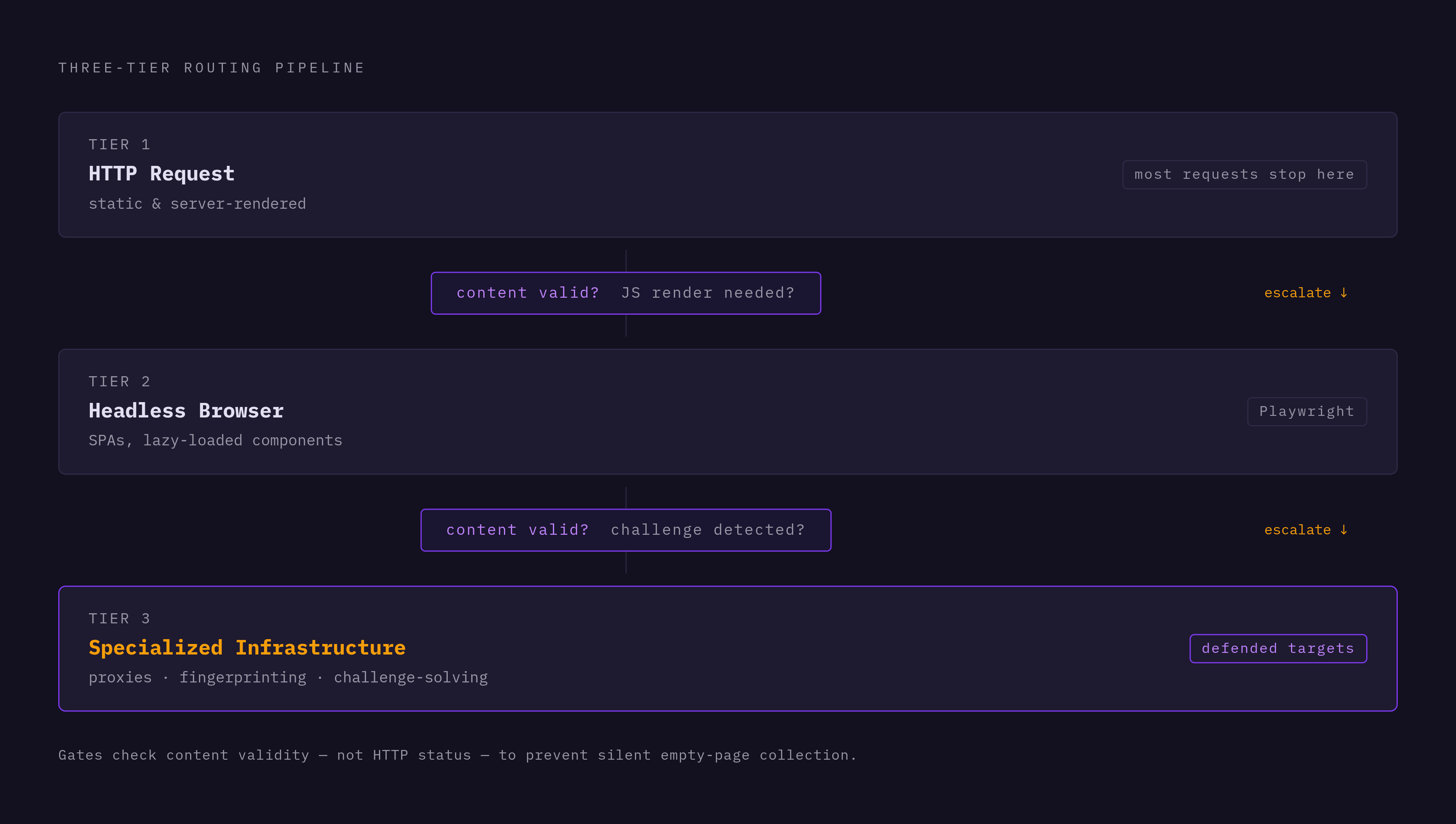
Start cheap. Escalate only when the page actually demands it. That's the whole logic, and most pipelines get it backwards by defaulting to the heaviest tool first.
Tier 1 is a plain HTTP request. Fast, cheap, and the right first move for static pages and anything server-rendered. Most requests should never leave this tier.
Tier 2 is a headless browser, Playwright or equivalent, invoked only when the response signals that content needs JavaScript to exist: single-page apps, lazy-loaded components, routes that build content dynamically.
Tier 3 is specialized infrastructure: residential proxies, fingerprint masking, automated challenge-solving. This tier costs the most and should be reserved for targets actively defended against scraping.
The routing decision belongs at the response-validation step. The system doesn't ask whether the HTTP call succeeded. It asks whether what came back looks like a challenge page, whether expected fields are missing, whether the content length is way off from what that page normally returns. Any of those signals triggers an escalation to the next tier.
That leads to a build-or-buy question that deserves an honest answer. Selector repair alone eats real time, with 10 to 15% of scrapers breaking weekly per the earlier community data, on top of fingerprint evasion, proxy rotation, and the validation logic needed to catch failures before they ship. None of that work is specific to any one product; it's infrastructure that has to exist regardless of what a team is actually building. Engineering hours spent maintaining that plumbing are hours not spent building whatever sits on top of the data it produces, and for most teams that trade isn't close.
Rendered HTML and the LLM-readiness output format problem
Getting a fully rendered page isn't the finish line. What that rendered page looks like once it's turned into text for an LLM matters just as much, and this is where a lot of pipelines quietly lose most of their value.
Take the case documented by Yash Dubey on Medium: scraping the Wikipedia "Association football" article through a markdown-based extraction API returned 373KB of content. The actual article, the part a person would call the substance of the page, came to roughly 15KB. The remaining 358KB was navigation menus, 246 language selector links, a table of contents built for on-page UI, sidebar widgets, appearance toggles, and edit buttons. In token terms, that's roughly 93,000 tokens sent in to deliver about 3,700 tokens of usable content, close to a 25x overpayment on a single request. Running that across a RAG pipeline indexing thousands of pages makes it not a rounding error. It's a real cost, and a real hit to answer quality.
The quality hit matters more than the cost. An LLM reading through that noise doesn't know a sidebar link to some 2019 listicle is less important than the paragraph sitting next to it; it treats both as content. Research into web scraping for AI pipelines found a typical web page runs 60 to 70% noise relative to its actual content, and that gap is the mechanism behind a lot of pipeline-driven hallucination that gets blamed on the model when the real cause sits upstream.
The same benchmark ran 500 e-commerce pages through GPT-4 and compared two extraction methods for product queries. Structured JSON extraction hit 94% factual accuracy. Markdown extraction on the same pages and same queries landed at 71%, a 23 percentage point gap. That gap causes downstream errors: a chatbot quoting the wrong price, an agent citing the wrong spec, or bad data working its way quietly into a training set. The NEXT-EVAL benchmark from 2025 backs this up from the model side: LLMs can clear F1 scores above 0.95 on structured web extraction, but only when what they're fed is actually formatted well. The extraction layer, not the model, is the bottleneck now.
The research is specific about which format wins where. Flat JSON got the best accuracy in the NEXT-EVAL study, an F1 of 0.9567, ahead of raw HTML or nested hierarchical structures, and it's the right fit for structured pipelines and agent workflows that need specific fields rather than prose. Clean Markdown preserves document structure and can work well for retrieval use cases, but only once the boilerplate is stripped out first: markdown full of nav links and sidebar junk doesn't get that benefit. And the AXE paper found that pruning the DOM, cutting boilerplate HTML before it ever reaches the LLM, cut token counts by 97.9% without hurting extraction quality. A 0.6B parameter model paired with smart DOM pruning hit an F1 of 88.1%, showing that getting extraction right doesn't require a bigger model. It requires cleaner input.
Schema-driven extraction, where a developer defines exactly which fields matter and the tool maps to that schema, should be the default. It forces the pipeline to return what's actually needed instead of dumping everything and hoping the model sorts signal from noise on its own.
How JS-rendered pages break RAG systems specifically
RAG systems carry a failure mode specific to them: staleness. An index reflects the world as it looked at crawl time, full stop. If competitor pricing got indexed last Tuesday and the price changed yesterday, the RAG pipeline will still cite last Tuesday's number, and it'll say it with full confidence, because nothing in the system knows the number is old.
JavaScript rendering makes that worse in two distinct ways. If the crawl silently failed on a dynamic page, that page just isn't in the index, and there's no signal anywhere that it's missing, since the system has no way of knowing what it never captured. And pages that sit deep in a site's link structure and update dynamically are hard for retrieval to handle well even when the crawl itself works fine, separate from any scraping issue.
JS-rendered, deep-linked pages represent a category of retrieval problem most RAG systems handle badly right now, not an edge case. A rendering failure at crawl time doesn't stay contained to the crawl. It affects the point where the system generates its answer.
The architectural response gaining ground is live-web RAG: instead of relying only on a standing index, the system uses a search API to find sources, fetches and cleans those pages at query time, and grounds its answer with citations pointing to what's actually live right now. The hardest design call in that setup is freshness TTL: deciding, topic by topic, when a query needs a live fetch versus when a cached chunk from the index is still good enough. It's freshness TTL: deciding, topic by topic, when a query needs a live fetch versus when a cached chunk from the index is still good enough.
Those agents need current information to do their jobs, which turns JS-rendering reliability from a backend annoyance into a product requirement.
Features to look for in a web extraction API built for AI pipelines
A few specs matter more than the rest when picking a tool to sit in front of an AI pipeline.
Output format comes first. Does the tool return clean Markdown or schema-defined JSON, or does it hand back raw HTML and leave the cleanup work to whoever's building on top of it? Given the 23 percentage point accuracy gap between structured and unstructured extraction covered earlier, this one spec has more influence on accuracy than anything else on this list.
Structured extraction through a developer-defined schema is what separates a tool built for pipelines from one built for casual scraping. Naming the exact fields needed (price, title, availability, whatever the use case calls for) and getting typed data back beats getting a best-effort markdown dump and hoping the fields you need happen to be in there somewhere.
Validation and failure detection decide whether bad extractions get caught or shipped straight to a user. Does the tool distinguish "something came back" from "the right thing came back"? Challenge page detection, checks that expected fields are actually present, and comparison against a historical baseline are the unglamorous features that catch a silent failure before it turns into a hallucinated answer.
Scalability matters at volume: rate limits, how many concurrent requests are allowed, and whether the tool is transparent about when it's routing a request through headless rendering versus a plain HTTP call. A pipeline running at scale needs to know which tier it's paying for on any given request.
Freshness and crawl scope need to match the use case. Single-page scraping, full-site crawling, and query-time fetching are three different jobs, and a RAG system especially needs to pick the right one depending on how time-sensitive the data is.
Integration speed is the last filter, and it's a practical one. Going from signup to a working API call should take minutes, not days. A clean REST API with clear schema options beats a framework that demands weeks of setup before it returns anything usable.
How the leading extraction APIs handle JS rendering and structured output
One extraction API built specifically around these problems is backed by Y Combinator, with customers including Mintlify, SiteGPT, and Sourcely, which puts it in production AI pipelines rather than side projects or demos.
Its pitch is to replace a fragmented stack of separate scrapers, crawlers, and data vendors with one API, instead of stacking another point solution on top of an already messy setup. It handles rendering on its own side, so pages that depend on scripts to display content get executed before anything comes back, and the output arrives as clean Markdown or schema-defined JSON, ready to feed into an LLM without a separate cleanup step. Rendering handled upstream, plus output already in pipeline-ready format, addresses both failure modes covered here directly: silent empty pages, and noisy output.
It fits teams building custom scraping automation into an existing product, and collection at a scale where managed infrastructure, rather than a self-hosted Playwright fleet, is worth the tradeoff.
ScraperAPI is another option worth knowing, with plans starting around $49 a month per the source pricing referenced here. Scrap.io's benchmarking work has looked at how it and similar tools perform on neural-network-based extraction methods, useful for teams weighing extraction quality against cost at scale.